

Introduction
Many beginners start a blog by writing about topics they think are interesting. Then the articles receive almost no traffic. The issue is usually not the quality of the writing. The problem is that the content is not targeting the words people actually search for. This is where keyword research for beginners becomes important.
When I started building my own website, I quickly realized something. Writing content without researching keywords first was like publishing articles blindly. I had no idea if anyone was searching for those topics.
So I began learning keyword research step by step while building my site. In this guide, I will show you the same beginner process I use when researching keywords for blog posts.
What Is Keyword Research in SEO?
Keyword research is the process of discovering the words and phrases people type into search engines, then using those keywords to guide your content strategy. It helps website owners understand what their audience is searching for and what topics they should create content about.
Search engines try to match search queries with the most relevant pages. According to Google’s SEO Starter Guide, understanding how people search helps you create content that answers those queries clearly.
For example, someone might search:
- “keyword research for beginners”
- “how to find keywords for a blog”
- “best keyword research tools”
Each of these searches represents a potential topic you could write about.
Without keyword research, you may write an article that nobody is searching for. With keyword research, you create content based on real demand.
That is why keyword research is often considered the foundation of SEO.
Why Keyword Research for Beginners Matters Before Writing Any Blog Post
Keyword research matters because it helps you understand what people are actually searching for before you start creating content. When your content matches real search queries, search engines are more likely to show your page in the results.
Search engines exist to answer questions. If your article answers the same question that users are typing into Google, it becomes much easier for your content to appear in search results.
Traffic distribution in search results is also very uneven. Research shows that the top results receive the majority of clicks. A study cited by Salesforce explains that the first page of Google captures most of the traffic from a search query.
That means ranking well for even one keyword can bring consistent visitors to your website.
Keyword research helps you identify those opportunities before you start writing. It also prevents you from targeting keywords that are too competitive for a new website.
Before jumping into keyword research, it is also important to understand the market and audience. If you haven’t done thorough research, you can check out this beginner tutorial on Market Research.
The 5 Metrics Beginners Must Understand Before Choosing Keywords
Before selecting a keyword, it is important to understand a few basic metrics. These numbers help you estimate whether a keyword is worth targeting.
Search Volume
Search volume tells you how many times a keyword is searched each month. Tools such as keyword research platforms estimate this number using search data.
According to Semrush, search volume helps marketers understand the potential traffic a keyword might bring.
A keyword with higher volume may attract more visitors, but it usually has stronger competition.
Keyword Difficulty
Keyword difficulty estimates how hard it will be to rank for a keyword.
This score usually considers factors like domain authority, backlinks, and the strength of existing pages ranking for that keyword.
For beginners, lower difficulty keywords are often a better starting point.
Search Intent
Search intent explains why someone is searching for a keyword.
Common types include:
- Informational searches (learning something)
- Navigational searches (finding a specific site)
- Transactional searches (buying something)
If your content matches the intent behind the keyword, it has a higher chance of ranking.
Short-Tail Keywords
Short keywords usually contain one or two words, such as:
“SEO”
“keyword research”
These keywords often have very high search volume but strong competition.
Long-Tail Keywords
Long-tail keywords are longer phrases with more specific intent. For example:
“keyword research for beginners step by step”
These keywords often have lower competition and clearer intent. According to Wikipedia’s explanation of keyword research, long-tail keywords often drive targeted traffic because they match specific search needs.
For new websites, long-tail keywords are usually the best place to start.
How I Actually Do Keyword Research (Step-by-Step)
Keyword research sounds complicated when you read SEO tutorials. Most guides talk about dozens of tools and advanced metrics.
But when I started building this website, I realized the process can be much simpler.
Now whenever I want to write a blog post, I follow the same workflow every time. This method helps me find keywords that people are already searching for.
Here is the exact process I use.
Step 1: Start With a Topic Idea
Every keyword research process starts with a topic.
This is simply the subject you want to write about.
For example, if I were running a pet blog, my topic might be:
Dog food
At this stage, you are not looking for the exact keyword yet. You are just choosing the general subject.
For my own website, the topics usually come from things I am learning while building the site, such as:
- keyword research
- SEO basics
- Google Analytics
- Google Search Console
Once I have the topic, I start looking for seed keywords.
Step 2: Find Seed Keywords
Seed keywords are the basic keywords related to your topic.
For the topic dog food, some seed keywords could be:
- dog food
- best dog food
- dog food brands
- homemade dog food
Seed keywords are important because they help keyword tools generate more ideas.
But before using tools, I always check something simpler first.
I go to Google itself.
Step 3: Use Google Autocomplete to Discover Real Searches
Google autocomplete is one of the easiest ways to find keyword ideas. When you start typing in Google, the search bar shows suggestions.
These suggestions are based on real searches people make.
For example, if I type:
dog food
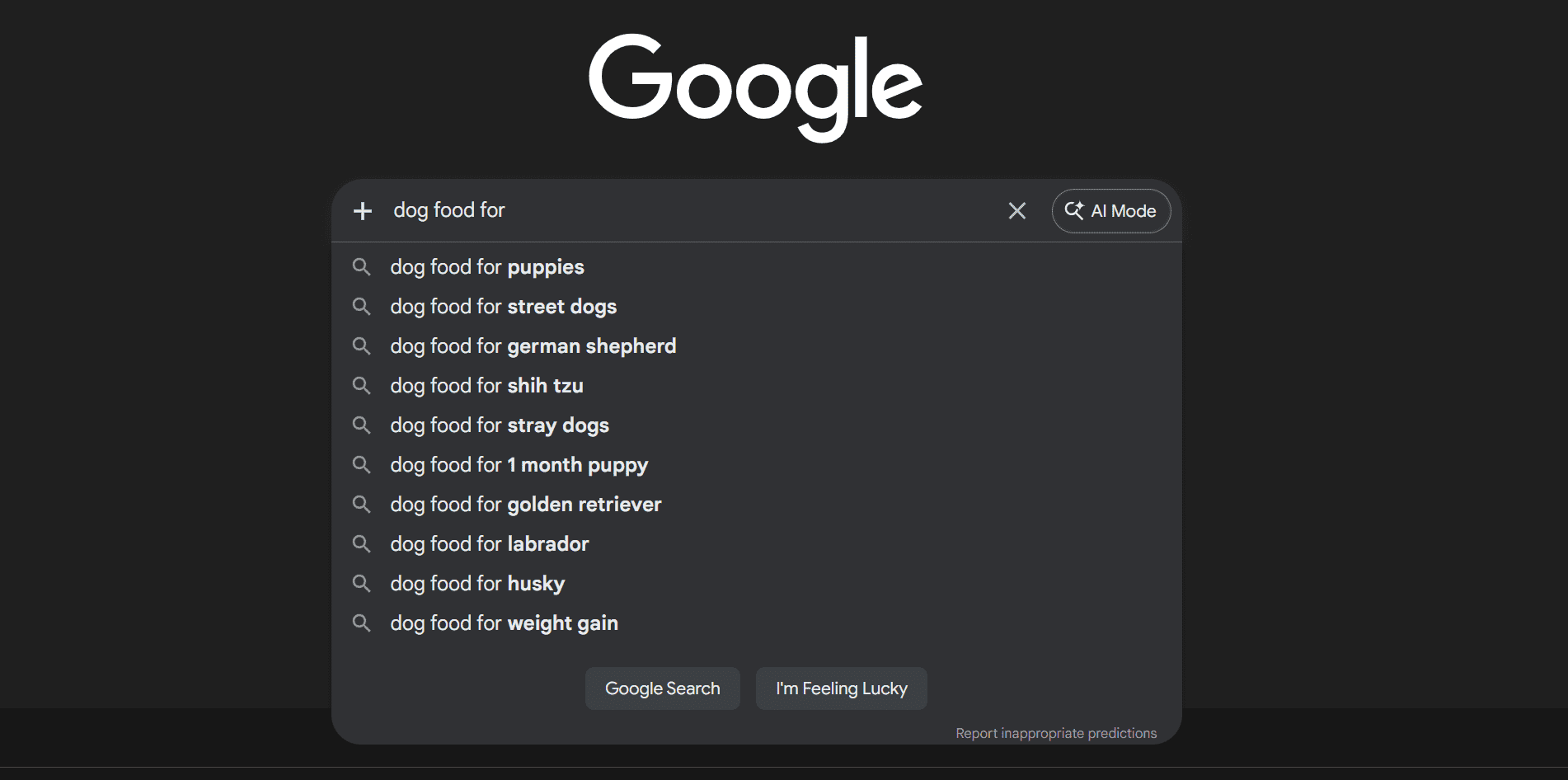
Google might suggest:
- dog food for puppies
- best dog food street dogs
- dog food for weight gain
- homemade dog food recipes
These suggestions are extremely valuable because they show what people are actively searching for.
I usually write down 10–20 keyword ideas from autocomplete.
Tip: You can put a space at the beginning or end of your keyword that would suggest you some more keywords. Similarly you can add “how to”, “ best”, “for”, etc.
But this is only the beginning.
Next I validate those ideas with a keyword research tool.
Step 4: Use Google Keyword Planner to Expand Keyword Ideas
After collecting autocomplete ideas, just open Google Ads Keyword Planner. It’s a free tool from google. If you don’t have an account you can open one for free of cost : https://business.google.com/us/google-ads/(In some countries, it may require you to enter your credit card).
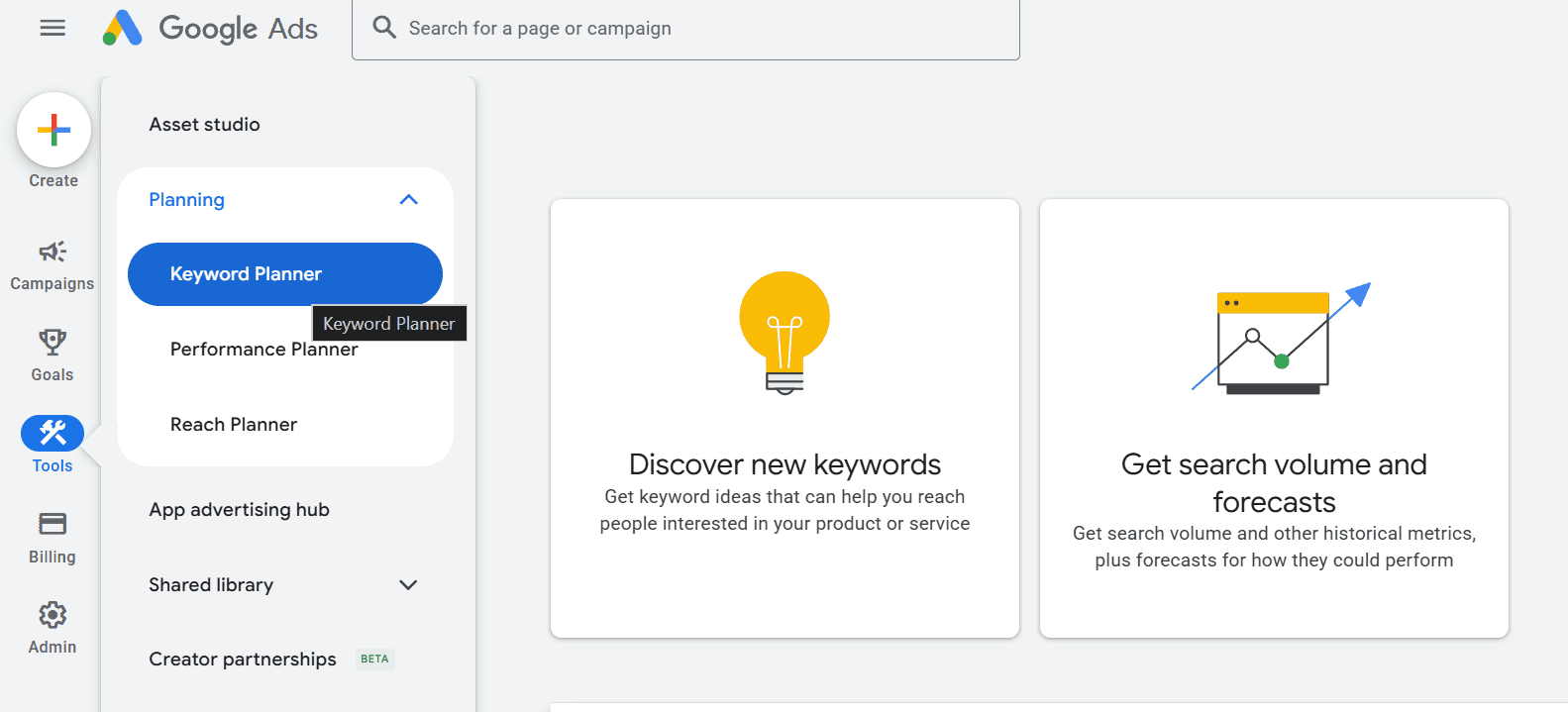
This tool shows:
- keyword ideas
- search volume estimates
- competition data
You can access it inside Google Ads → Tools → Keyword Planner → Discover New Keywords.
I enter the seed keywords I collected earlier. Then I select the location where I want to rank.
Example:
dog food
best dog food
homemade dog food
Then I select the location where I want to rank. If you want to rank globally, just unselect/remove every country.
Keyword Planner then generates thousands of related keyword ideas.
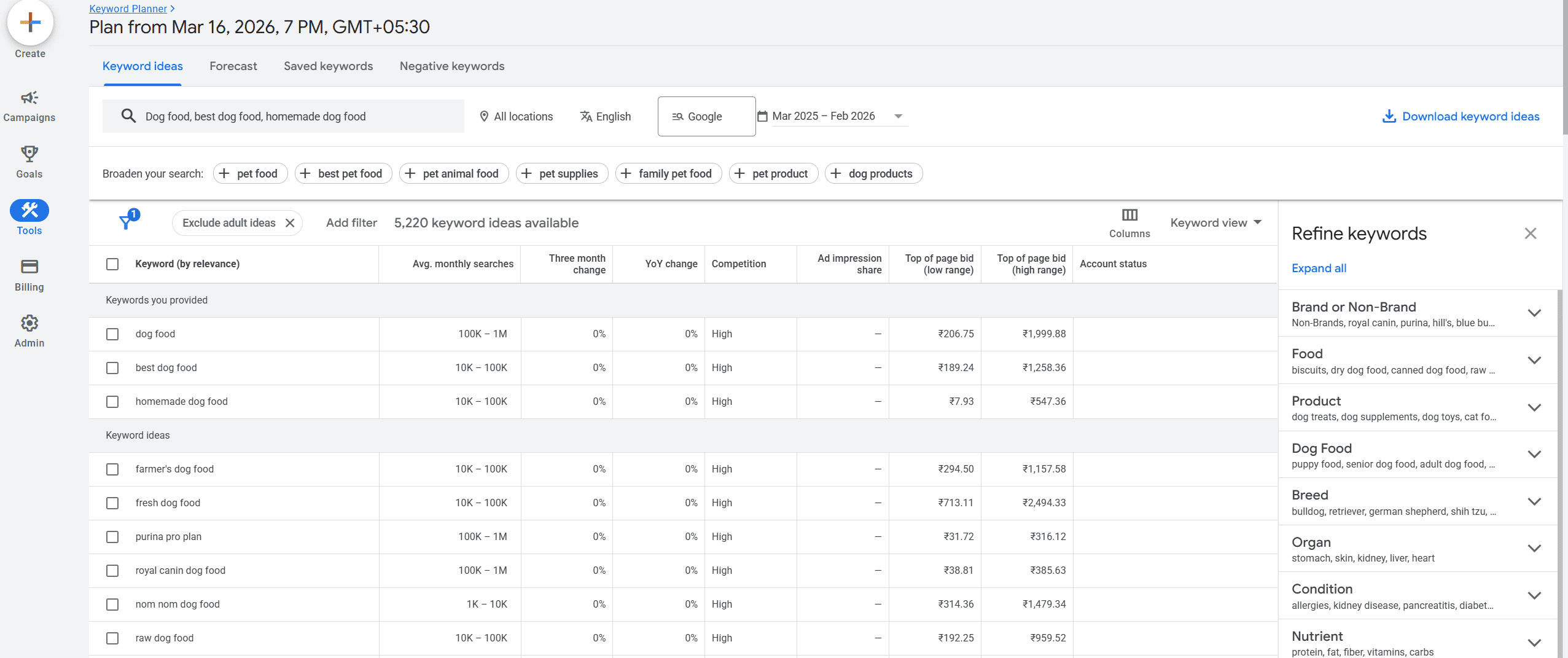
Always look for long tail keywords if your website is brand new. My recommendation is to find keywords that are 4-6 words long.
This step helps expand one idea into many potential blog topics.
Step 5: Filter Keywords by Search Volume
Now comes the important part. Not every keyword is worth targeting.
My personal rule when researching keywords is to look for: Search volume between 1k and 10k. (If the keyword is very specific and low competition, even 100–500 searches/month can be worth it.)
The keyword planner will show you an estimated search volume if you haven’t previously spent on ads. But it is more than enough for now.
This range is ideal for beginners because:
- It shows real search demand
- Competition is usually manageable
- The keyword is not too broad
For example:
| Keyword | Monthly Searches |
|---|---|
| best dog food | 10k-100k |
| high quality dog food | 100k-1M |
| best fresh dog food | 1k-10k |
In this case:
- high quality dog food is probably too competitive
- best dog food looks promising
- best fresh dog food could also be good
These are longer phrases like: “best dog food for puppies with sensitive stomach” and you just need to find them.
Long-tail keywords often have lower competition and clearer search intent.
Let’s search for 4-word keywords with a search volume of 1k-10k.
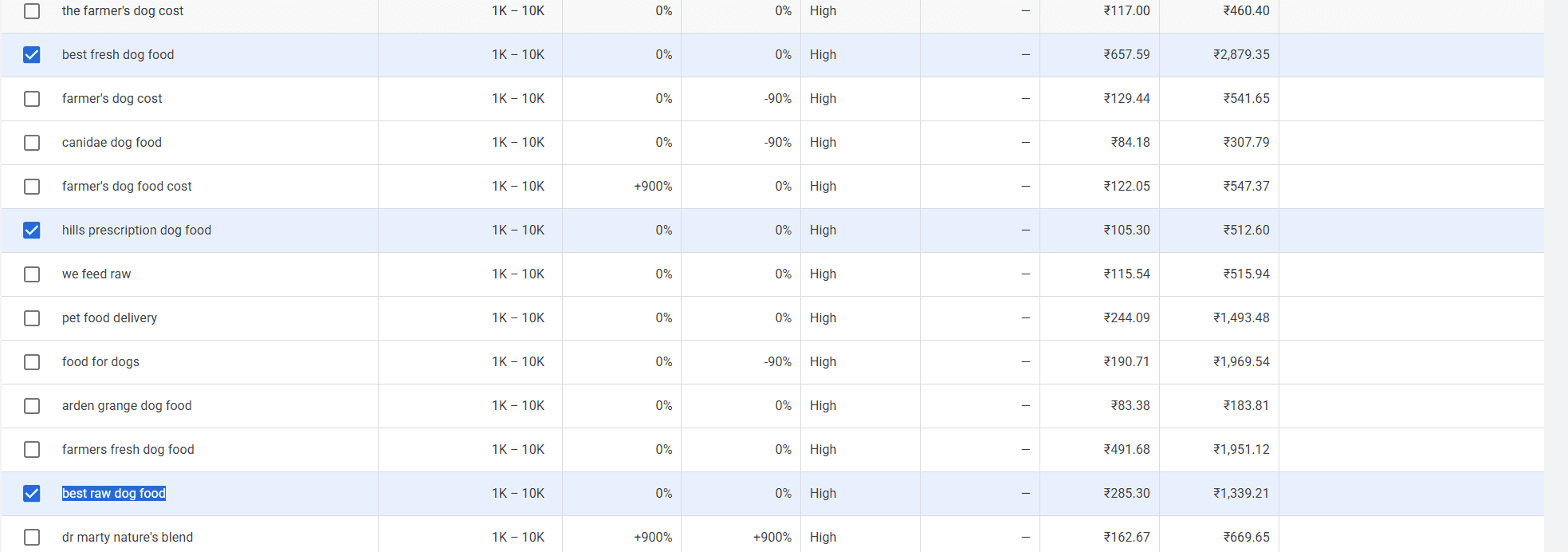
We found “best fresh dog food”, “hill prescription dog food”, “best raw dog food”. Yes, the search intent of these keywords doesn’t match with each other, but let’s for now, just focus on the process.
Step 6: Check Keyword Difficulty (Ahrefs or Semrush)
Search volume alone is not enough.
A keyword might have good traffic potential but still be impossible to rank for.
So the next step is checking keyword difficulty.
For this, I use tools like:
- Ahrefs (It has a free Keyword Difficulty Checker)
- Semrush (You can create a free account with 10 free searches/day).
I paste the keyword into the tool and look at the keyword difficulty score.
Example:
| Keyword | Volume | Difficulty |
|---|---|---|
| best fresh dog food | 1-10k | 46 |
| hill prescription dog food | 1-10k | 12 |
| best raw dog food | 1k-10k | 14 |
Keyword difficulty is ranked from 1-100. 1 means very easy to rank, and 100 means super hard to rank.
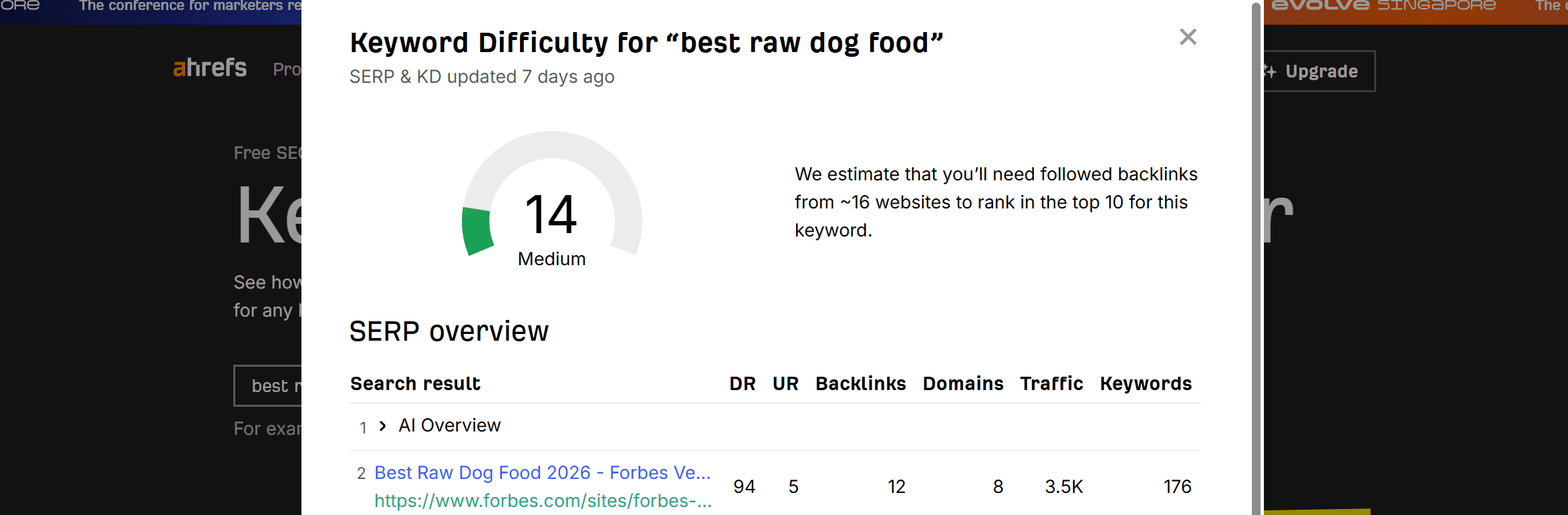
If the difficulty is too high, I usually skip the keyword.
For a newer website, I try to find keywords that have:
- decent search volume
- lower difficulty
This step helps avoid targeting keywords that are dominated by large websites.
Step 7: Organize Keywords in a Spreadsheet
Finally, I organize everything in a simple spreadsheet.
This helps me track which keywords are worth writing about.
My sheet usually includes:
| Keyword | Volume | Difficulty | Intent | Notes |
|---|---|---|---|---|
| dog food for puppies | 10-100k | 62 | informational | maybe later |
| homemade dog food recipe | 1k-10k | 28 | informational | good topic |
This sheet becomes my content idea bank.
Whenever I want to write a blog post, I simply open the sheet and pick a keyword that looks promising.
Why This Keyword Research Process Works for Beginners
This process works well because it focuses on real search behavior.
Instead of guessing topics, you are using:
- Google search suggestions
- keyword databases
- search volume data
- difficulty metrics
Each step reduces uncertainty.
When I started building my site at https://uniqlabspace.com, keyword research helped me understand what beginners were actually searching for.
Instead of writing random articles, I now focus on topics that people already want to learn.
Over time, this makes content much more likely to appear in search results.
Best Free Keyword Research Tools for Beginners
Several tools can help beginners perform keyword research without large budgets.
Here are some useful options.
Google Keyword Planner
Google Keyword Planner provides keyword ideas and search volume estimates. It is designed for advertisers but also useful for SEO research.
Ubersuggest
Ubersuggest provides keyword suggestions, difficulty estimates, and content ideas.
It is beginner friendly and easy to explore keyword variations.
Google Autocomplete
Google itself is one of the best keyword research tools.
The search suggestions that appear when you type in the search bar reflect real search queries.
Exploding Topics
Platforms like Exploding Topics identify emerging search trends before they become widely popular.
This can help you discover topics that are gaining interest.
Semrush Free Tools
Many SEO platforms offer limited free tools that allow beginners to analyze keyword volume and competition.
Even simple tools can reveal valuable keyword ideas when used consistently.
Conclusion
Keyword research sounds intimidating when you first hear about it. But as you can see, the actual process is pretty simple once you break it down into steps.
You don’t need expensive tools. You don’t need years of SEO experience. You just need a topic, Google autocomplete, a free tool like Google Keyword Planner, and a simple spreadsheet to track everything.
Here is a quick recap of what we covered:
Start with a topic you want to write about. Find seed keywords around that topic. Use Google autocomplete to discover what people are actually typing. Validate those ideas in Google Keyword Planner. Filter by search volume — aim for 1k to 10k, but don’t ignore great low-competition keywords even if they’re below that. Check keyword difficulty so you’re not walking into a fight you can’t win yet. And finally, organize everything in a spreadsheet so you always have a content idea ready.
That’s it. That’s the whole process.
I personally use this exact workflow for every blog I publish on this site — including this one. It’s not perfect, and I’m still learning. But it beats writing randomly and hoping Google notices.
If you try this process, I’d love to know — what keyword did you end up picking? Drop it in the comments below. And if you want to go deeper into SEO and website growth, check out the other guides on UniqLabSpace. We’re building this together, one step at a time.