
Introduction
When I first built my website, I thought publishing content was enough. I wrote blogs. I hit publish. Then I searched my posts on Google.
Nothing.
If you’re dealing with a website not ranking, I’ve been exactly where you are.
My site is about 2 months old. At one point, only 7 pages were indexed. Recently, I published a blog and realized it wasn’t even indexed. I had to manually go into Google Search Console and request indexing.
That moment changed how I look at SEO.
Because the problem wasn’t just “Google takes time.”
The problem was, I didn’t fully understand how ranking actually works.
Let’s break this down properly.
Why Is My Website Not Ranking on Google?
Your website is not ranking on Google because it is either not indexed, targeting the wrong keywords, lacking strong content, missing backlinks, or facing technical issues. New websites also take time to gain trust, so rankings don’t happen immediately.
Here’s what I realized after struggling with my own site.
Ranking is not one thing. It’s a system.
Google needs:
- Access to your pages (indexing)
- Confidence in your content (quality)
- Trust in your website (authority)
If even one of these is weak, your site struggles.
In my case, indexing and authority were the biggest problems.
Is Your Website Even Indexed by Google? (This Was My First Mistake)
Your website must be indexed before it can rank. If Google hasn’t stored your pages, they simply won’t appear in search results.
This sounds obvious, but I ignored it at first.
I assumed Google would automatically find everything.
It didn’t.
When I checked using:site:yourdomain.com
I saw only a few pages indexed.
Then I checked Google Search Console.
One of my latest blogs wasn’t indexed at all.
I had to manually request indexing.

According to Google’s official indexing documentation, pages must be crawled and processed before they can appear in search.

What you should do right now:
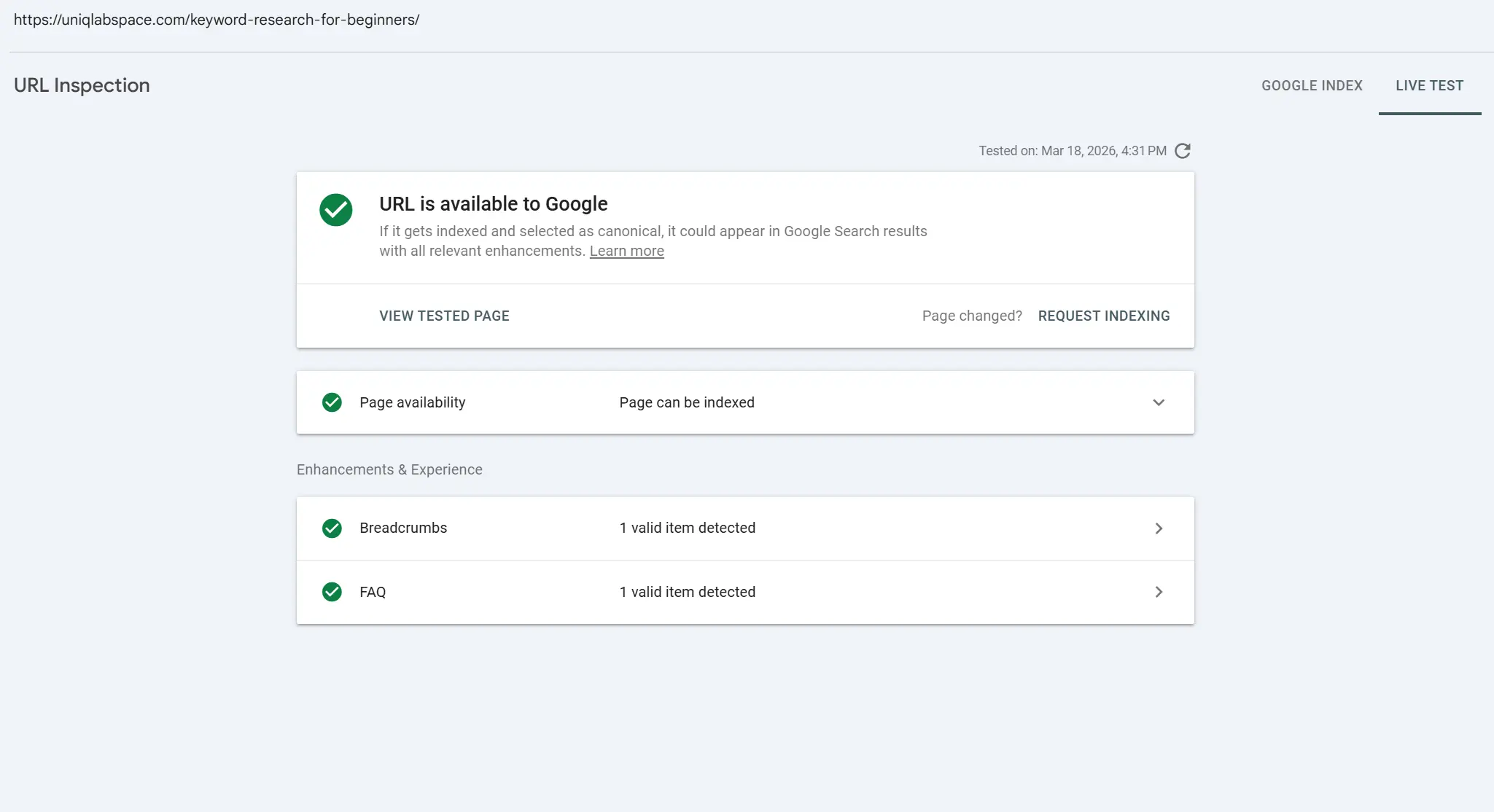
- Open Google Search Console
- Go to URL inspection
- Paste your blog URL
- Click “Request Indexing”
A sitemap is basically a map of your website. It tells Google which pages exist and which ones to crawl. Without it, Google has to discover your pages on its own, which can take weeks, or sometimes never happen at all. Most website platforms like WordPress generate a sitemap automatically. You just need to submit it inside Google Search Console under the Sitemaps tab.
After you request indexing, Google usually takes anywhere from a few hours to a few days to process it. To check if it worked, go back to URL Inspection in Search Console and search your page URL again. If it shows “URL is on Google,” you’re indexed.
If it still doesn’t get indexed after a week, check two things — is the page set to noindex accidentally, and is your content thin or near-duplicate? Google sometimes skips pages it considers low value.
You’re Targeting the Wrong Keywords (I Made This Mistake Early)
If you target keywords that are too competitive, your website will not rank, even if your content is good.
I did this in the beginning.
I wrote blogs without properly checking keyword difficulty.
Result: zero impressions.
Tools like SEMrush explain that high-volume keywords often come with high competition, making them hard for new websites to rank (source).
Here’s what changed for me:
- I stopped chasing broad keywords
- I started focusing on beginner-specific queries
For example:
- Bad: “SEO tips”
- Better: “SEO tips for beginners with new website
But how do you actually judge if a keyword is worth targeting? Here’s a simple 3-point check I use now before writing any post:
Is the search volume above 100 per month? Anything lower means very few people are searching for it, which limits your potential traffic even if you rank number one.
Is the keyword difficulty below 20? For a new site with low authority, anything higher is extremely hard to compete for. Tools like Ahrefs show this as a KD score.
Does the keyword match what your content actually covers? This is called search intent. If someone searches “keyword research tools” they want a list of tools — not a 2000 word explanation of what keyword research means. Matching intent is just as important as matching the words.
You can check all of this using free or affordable tools like Ubersuggest, Ahrefs, or Google Keyword Planner. Don’t guess. Always verify before you write.
If you’re still guessing keywords, fix this first using a proper keyword research guide.
Your Content Isn’t Strong Enough (And I Had to Accept This)
Google ranks content that is helpful, complete, and better than what already exists.
This is the hardest truth.
Because it means your content might not be good enough yet.
Google’s helpful content guidelines clearly say content should focus on real users, not just rankings.
When I compared my blog to top-ranking pages, I noticed:
- They covered more depth
- They answered more questions
- They were structured better
Let me give you a concrete example of what depth actually looks like.
If someone searches ‘how to fix indexing issues’, a weak post just says ‘submit your sitemap.’ A strong post explains what a sitemap is, how to submit it, how to check if it worked, and what to do if the page still doesn’t get indexed after a week. Same topic, completely different depth. The stronger post answers every follow-up question the reader might have.
There’s also something called search intent, which most beginners don’t know about. Search intent simply means — what is the person actually trying to do when they type something into Google? Are they trying to learn something? Compare options? Find a specific website? Buy something?
If your content doesn’t match that intent, Google will not rank it, even if it’s well written and keyword optimised. For example, if someone searches ‘best SEO tools’, they want a comparison list. If you write a 3000 word essay on the history of SEO tools instead, Google will skip your page because it doesn’t match what the searcher actually wants.
Before writing any post, ask yourself: if I typed this keyword into Google right now, what would I actually want to find? Write that.”
A study by Backlinko shows that in-depth content tends to perform better in rankings (source).
This is where understanding your audience matters.
Before writing, you need to know:
- What people are actually searching
- What problems they are trying to solve
That’s why learning market research is critical.
No Backlinks, No Authority (This Is Where Most Beginners Get Stuck)
Backlinks are one of the biggest reasons your website is not ranking.
And this is where I struggled the most.
At the start, my site had zero backlinks.
That means Google had no reason to trust it.
According to Ahrefs, pages with more backlinks tend to get significantly more organic traffic (source).
But here’s the problem.
Most advice online says:
“Build backlinks”
But doesn’t tell beginners how.
Here’s what actually works when you’re starting from zero:
1. Directory Listings (Easy Wins)
Submit your site to:
- Google Business Profile
- Local directories
- Niche directories
These are simple backlinks and help Google discover your site faster.
2. Community Sharing (Underrated)
Share your blog posts on:
- Quora
- Facebook groups
Not spam. Add value first, then link naturally.
3. Guest Posting (Slow but Powerful)
Write for small blogs in your niche.
Even one backlink from a real site is more powerful than 10 random ones.
4. Build Linkable Content
This is something I’m still working on.
Content that attracts backlinks includes:
- Guides
- Case studies
- Data-backed posts
Right now, most beginner blogs don’t get backlinks because they don’t stand out.
What You Should Avoid
- Buying backlinks
- Spam comments
- Low-quality link farms
These can harm your site.
Technical Issues That Kill Rankings (Even If You Don’t Notice)
Technical SEO sounds complicated, but for beginners, it’s just basics.
If your site is slow or broken, Google won’t rank it well.
Google confirms that page speed is a ranking factor, especially on mobile (source).
Here’s what I checked on my own site:
- Page speed
- Mobile responsiveness
- Broken links
If you’re using WordPress + Elementor, focus on:
- Lightweight themes
- Optimized images
- Fewer plugins
Tip: Always convert your images to a .webp file. It significantly reduces the Image sizes. Here’s a free tool to achieve that: CloudConvert
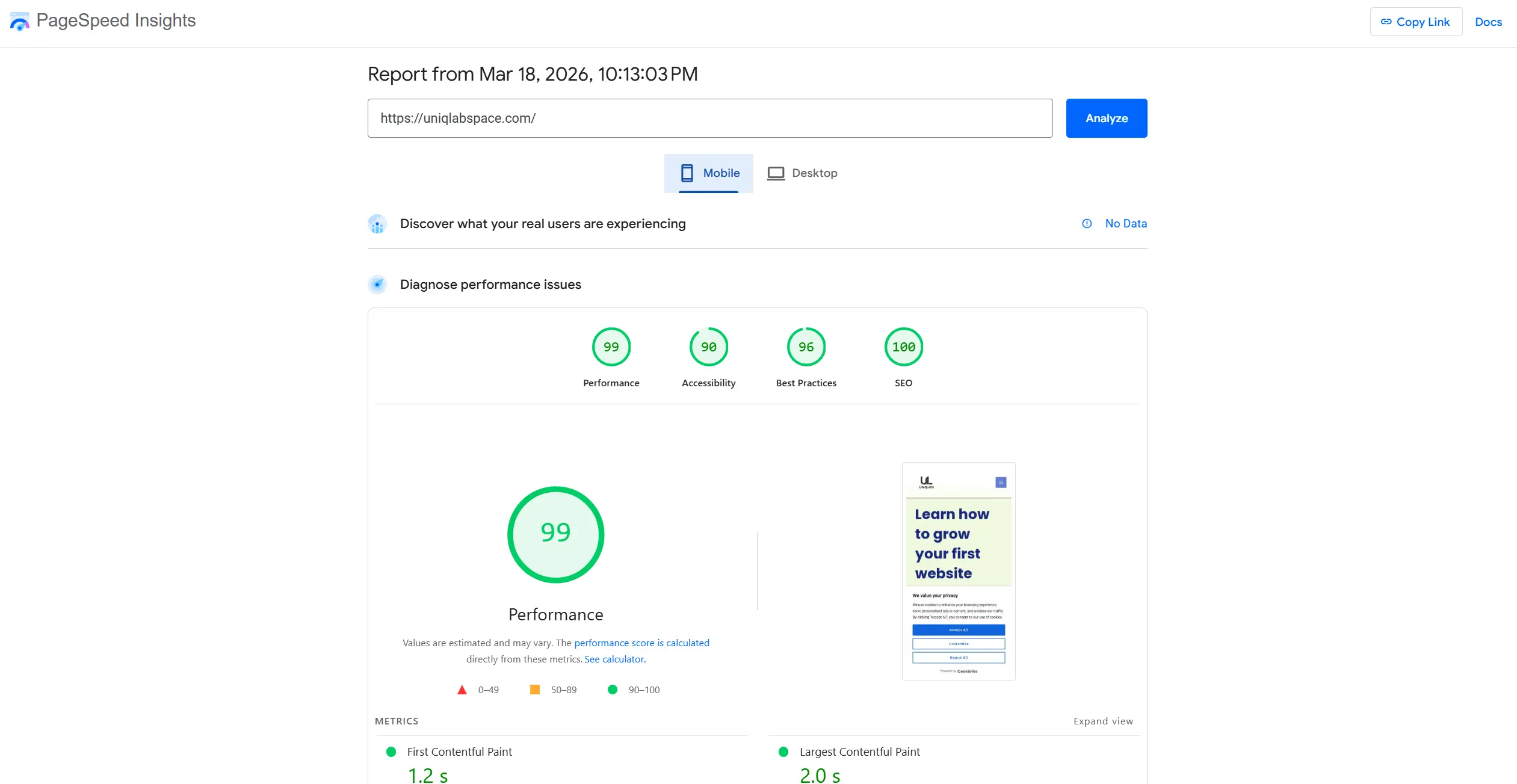
If you want to check your site’s speed right now, go to Google PageSpeed Insights and paste your URL. It gives you a score out of 100 and tells you exactly what’s slowing your site down. Aim for above 70 on mobile.
For mobile friendliness, use Google’s Mobile Friendly Test, it’s free and takes 30 seconds. Just paste your URL and it tells you immediately if there’s a problem.
For broken links, Google Search Console shows these under the Coverage report. A broken page returns a 404 error, which means visitors and Google both hit a dead end. Fix these as soon as you find them.
One more technical issue beginners often miss is missing meta descriptions. A meta description is the short text that appears under your page title in Google search results. It doesn’t directly affect rankings, but it affects whether someone clicks your link. If you leave it blank, Google picks random text from your page, which often looks messy and unprofessional. Write a clear, one to two-sentence meta description for every post you publish.
Also, you should track website performance so you know what’s working and what’s not.
How Long Does It Take for a Website to Rank?
A new website usually takes 3 to 6 months to start ranking, sometimes longer.
I’m currently in that phase.
Most people treat this waiting period as dead time. It’s not.
While waiting for rankings, I’m using this time to publish consistently, fix technical issues I discover along the way, and slowly build backlinks by sharing content in relevant communities. Every week, I check Google Search Console to see if new pages are getting indexed and if any keywords are starting to appear, even at position 80 or 90. That early movement tells you Google is noticing your content.
The waiting period is actually your best opportunity to strengthen your foundation. If you stop publishing and building during this phase, you’ll be starting from scratch again by the time Google is ready to trust your site.
At 2 months, I’m still seeing very slow progress.
According to HubSpot, SEO results take time and depend on consistency and competition (source).
This is where most people quit.
But here’s what I’ve learned:
- SEO is slow, but predictable
- If you do the right things, results come
You just need to stay consistent.
Conclusion
If your website is not ranking right now, it’s not because you’re unlucky or because SEO is too complicated.
It’s because one or more key pieces are missing, and once you identify which ones, fixing them is completely doable.
Two months into building my own site, I’m still in this phase. My pages are slowly getting indexed, keyword targeting is improving and backlinks are close to zero. But I understand the system now, and that clarity is what changed everything for me.
Start with indexing. Then fix your keywords, improve your content and then build authority slowly.
Don’t try to do everything at once. Just improve one thing this week.
I’m on the same journey. If you want to follow along and see what actually works on a real beginner site, check out my other guides on UniqLabs: I document everything as I go.