Introduction
If you’ve just launched your website and nothing is happening, you’re not alone.
I was in the same situation. My site was around 2 months old, only a few pages were indexed, and one of my blog posts wasn’t even showing up on Google. I had to manually request indexing through Google Search Console just to get it noticed.
That’s when I realized something important. Most SEO guides skip the real beginner phase. They talk about strategies that only work when your site already has authority.
This guide is different.
This is SEO for a new website, not an established one. I’ll walk you through exactly what matters in the early stage, what I did, what didn’t work, and what actually helped.
If your site is new and you’re confused about where to start, this will give you a clear path.
What Is SEO for a New Website and How Is It Different?
SEO for a new website means optimizing your site so Google can find, understand, and trust it, even when you have zero authority, no backlinks, and little content.
When your site is new, Google doesn’t trust you yet. It doesn’t know if your content is reliable. This is why new websites often struggle to rank, even if the content is good.
According to the Google Search Central documentation, Google first needs to crawl and index your pages before they can rank.
There’s also something many SEOs call the “sandbox phase.” Whether Google officially calls it a sandbox or not does not matter much in practice. The reality is simple: new websites typically take 3 to 6 months to see real ranking movement, even when you are doing everything right. Plan for that timeline from day one. It is not a sign that something is broken. It is just how Google builds trust in new sites.
So your job in the beginning is simple:
- Get indexed
- Build trust
- Target easy keywords
Don’t expect traffic in the first few weeks. Focus on the process.
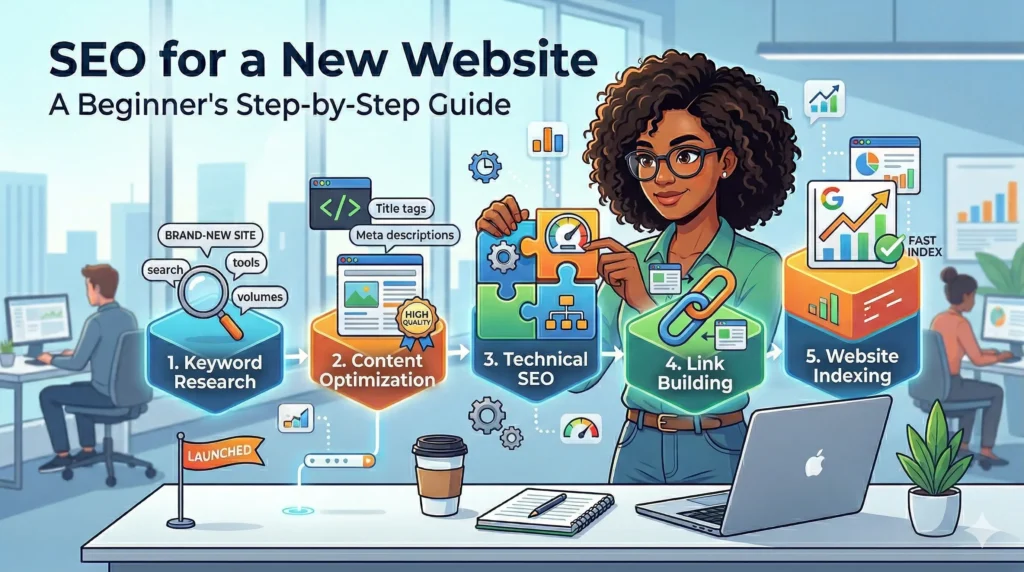
Step 1: How Do You Get Your Website Indexed on Google Fast?
Getting indexed means telling Google your pages exist so they can appear in search results.
The fastest way to do this is by setting up Google Search Console, submitting your sitemap, and manually requesting indexing for important pages.
Here’s exactly what I did.
First, I connected my site to Google Search Console. Then I checked my sitemap. Since I use WordPress with Yoast SEO, the sitemap was already generated.
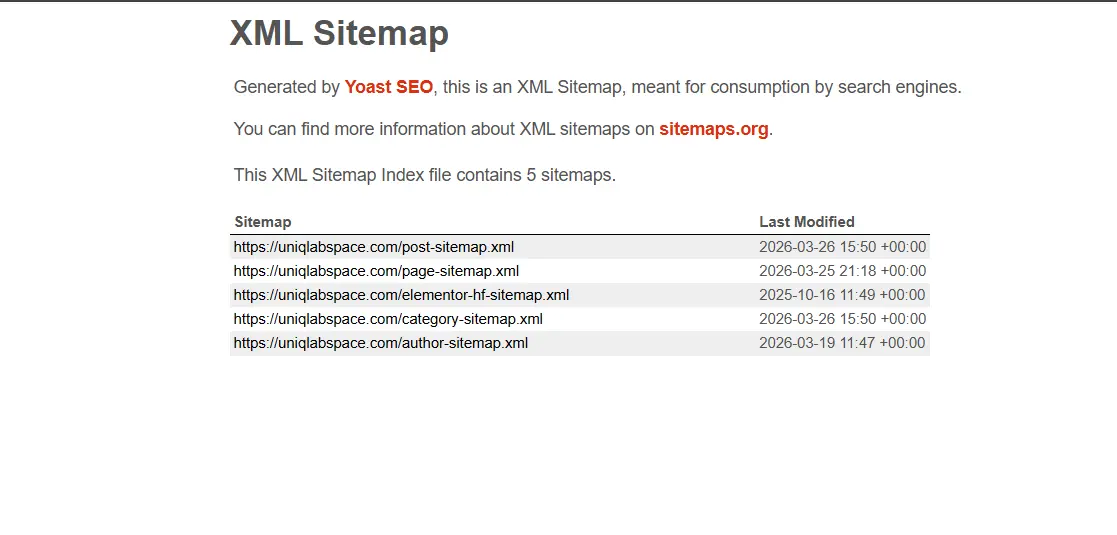
This is how you can check it. Open your browser and type:
yousiteURL/sitemap_index.xml
If you see a page with a list of XML links like this — you already have it ✅
If it shows a 404 error — you don’t have it yet ❌
But here’s where I made a mistake.
I assumed Google would automatically find everything. It didn’t.
One of my blog posts wasn’t indexed at all. When I checked in Search Console, it showed “Discovered, not indexed.”
So I manually used the URL inspection tool and clicked “Request Indexing.” Here I have mentioned the exact steps I took to index.
After that, it finally got indexed.
According to Google’s official guide on sitemaps, submitting a sitemap helps Google discover your pages faster, but it doesn’t guarantee indexing.
Key things you should do:
- Submit your sitemap in Search Console
- Use URL inspection for new pages
- Make sure your pages are not blocked by robots.txt
- Avoid publishing low-quality or thin content
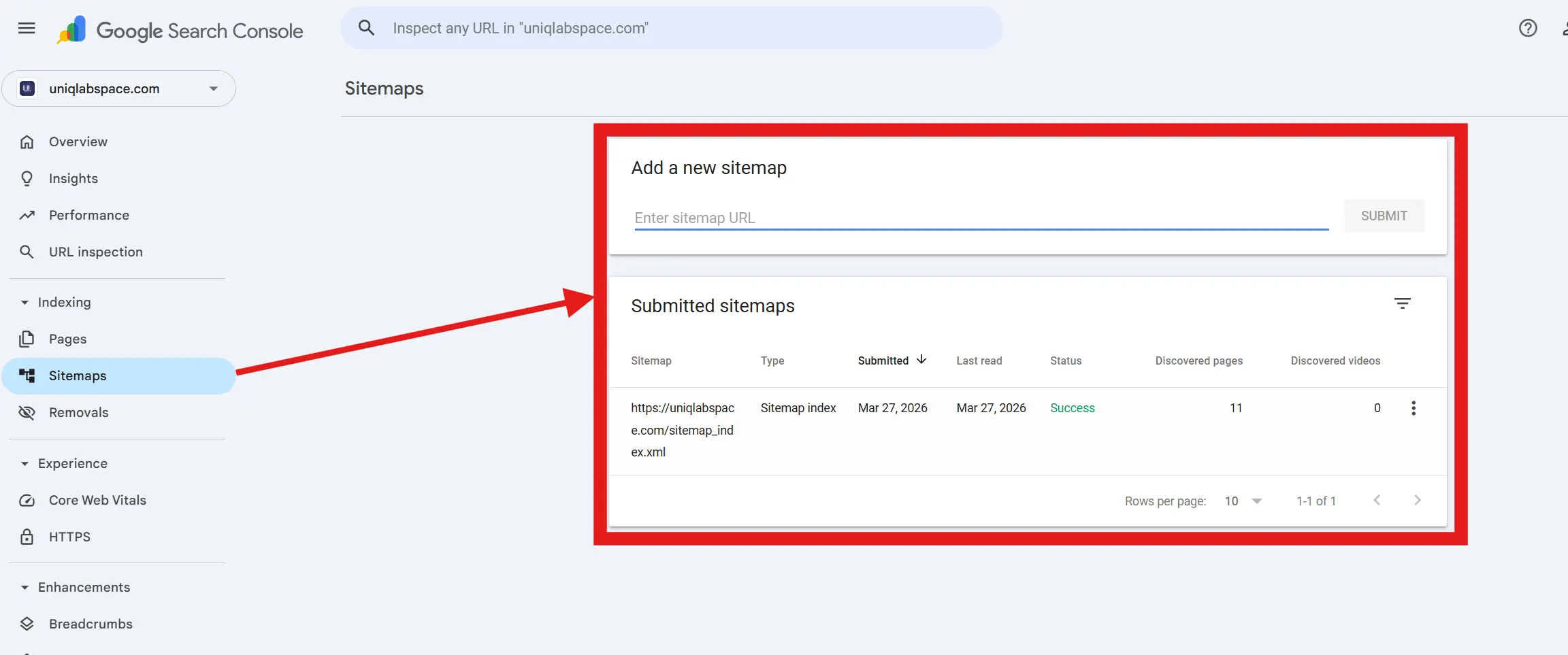
If it’s not available just enter this on the Add a new sitemap
https://your_domain/sitemap_index.xml
If your pages aren’t indexing, this is the first thing to fix.
Step 2: Keyword Research for a Brand-New Website (What Actually Works)
For a new website, keyword research means finding low-competition, long-tail keywords that you actually have a chance to rank for.
This is where most beginners go wrong.
They target high-volume keywords thinking more searches equals more traffic. But without authority, you won’t rank for those keywords. Not even close.
I learned this the hard way.
I was analyzing the keyword “seo for new website” and checked it across four different tools. Here’s what I got:
| Tool | KD Score |
|---|---|
| Ahrefs | 6 |
| SE Ranking | 38 |
| Semrush | 39 |
| Ubersuggest | 53 |
Same keyword. Four completely different numbers. That’s confusing for anyone, especially if you’re just starting out.
So which one do you trust?
Trust Ahrefs the most. Its KD score is based almost entirely on how many backlinks the top-ranking pages have. If those pages have very few backlinks, Ahrefs gives a low score. That’s the most useful signal for a new site because backlinks are the hardest thing to compete with early on.
Semrush and SE Ranking sit in the middle. They mix backlinks with page quality and domain strength. They are generally reliable but tend to score a bit higher than reality for low-competition terms.
Ubersuggest almost always inflates scores. Most experienced SEOs ignore it for KD. You can use it for keyword ideas, but don’t let it scare you off a good keyword.
So for “seo for new website,” the honest read is: the backlink barrier is low (Ahrefs says so), but there is some real content competition (Semrush confirms it). That means you can target it, but you need a genuinely helpful article, not a thin 500-word post.
After checking the tools, I went one step further. I Googled the keyword manually and looked at the actual results.
If the first page is filled with Ahrefs, Moz, or Backlinko, skip it for now. If you see smaller niche blogs or newer sites ranking, that is your green light.
A study by Backlinko shows that backlinks and domain authority still play a major role in rankings. So as a new site, avoid going head-to-head with strong domains early on.
What works better for new sites:
- Long-tail keywords (3 to 6 words)
- Keywords with clear intent (how to, beginner guide, step by step)
- SERPs where smaller blogs are already ranking
If you want a full breakdown, check my keyword research guide where I walk through the exact process I use.
Step 3: Content That Ranks (Even Without Authority)
Content ranks when it matches search intent better than anything else on the page.
Search intent simply means understanding what the user actually wants when they type something into Google.
For example:
- “SEO for new website” means the person wants a beginner guide, step by step
- “best SEO tools” means they want a list with comparisons
- “how to fix indexing issue” means they want a quick, direct solution
According to a HubSpot SEO report, content that aligns with user intent performs significantly better than content that just stuffs in keywords.
When I started writing, I made a mistake. I thought longer content automatically ranked better. It doesn’t.
What actually worked for me:
- Clear structure: Use H2s and H3s so the reader (and Google) can scan the page easily
- Simple explanations: Write like you’re explaining to a friend, not writing a textbook
- Direct answers: Answer the main question within the first two paragraphs, not at the end
- Covering real beginner pain points: Think about what confused you when you started. Write about that.
Here is a simple way to think about it. Before you publish anything, ask yourself: “Does this answer the question better than what is already ranking on page one?” If the honest answer is no, make it better before publishing.
Internal linking also matters more than most beginners realize.
When you link one blog post to another, you are telling Google how your content is connected. It also keeps readers on your site longer, which is a good signal.
For example, I link this post to my market research process because understanding your audience is part of good content strategy. And if your site is still struggling to get traffic, my why your website is not ranking guide breaks down the most common issues I ran into.
Think of your content like this: you are not trying to impress Google. You are trying to help a real person better than anyone else has. Google rewards that.
Step 4: Building Your First Backlinks (Without Spam)
Backlinks are links from other websites pointing to your site. They are one of the strongest ranking signals Google uses.
For a new website, you do not need hundreds of backlinks. You just need a few quality ones to start building trust with Google.
A study by Backlinko found that pages with more backlinks consistently rank higher. But the keyword is quality, not quantity.
Here is where most beginners mess up. They either ignore backlinks completely and just publish content, or they panic and buy cheap links from Fiverr. Both are mistakes.
Ignoring backlinks means Google has no external signals to trust your site. Buying spam links can get your site penalized. Neither moves you forward.
So what should you actually do as a new site?
Start with the basics that anyone can do:
1. Create social profiles and link to your site Set up LinkedIn, Twitter/X, and Instagram profiles for your brand and link back to your website. These are not powerful backlinks, but they are safe, real, and help establish your site exists.
2. Submit to legitimate directories There are free, legitimate directories where you can list your site. Examples include Google Business Profile (if applicable), AllTop, and niche-specific directories in your space. Avoid any directory that asks you to pay for a basic listing or looks spammy.
3. Engage genuinely on other blogs Find blogs in your niche and leave thoughtful comments. Not “great post!” but something that adds to the conversation. Some blogs allow you to include your website URL in the comment form, which gives you a small backlink. The real benefit though is visibility. Blog owners notice good commenters and sometimes link back to them.
4. Reach out for small collaborations This sounds scary but it does not have to be. Find other beginner bloggers or small niche sites and offer to share each other’s content. Even a simple mention in someone else’s post is a legitimate backlink.
Right now, my own backlink profile is still small. I am not going to pretend otherwise. But that is completely normal at this stage.
The goal is not to build 100 backlinks in a month. The goal is to build 5 to 10 real, relevant links that tell Google: this site is legitimate. That is enough to start.
Step 5: Technical SEO Basics You Should Not Ignore
Technical SEO means making sure Google can actually crawl, read, and understand your website. It sounds complicated but for a new site, you only need to get a few things right.
Think of it like this: even if your content is great, if your house has a locked front door, no one gets in. Technical SEO is unlocking the door.
Here are the most important things to check:
1. Page speed Your site should load in under 3 seconds. Slow sites frustrate users and Google notices. According to Google’s Core Web Vitals documentation, page speed and overall user experience are real ranking signals.
To improve speed on WordPress (which I use with Elementor and Hostinger):
- Compress and resize images before uploading (I use .webp format)
- Remove plugins you are not actively using
- Use a caching plugin like WP Rocket or LiteSpeed Cache
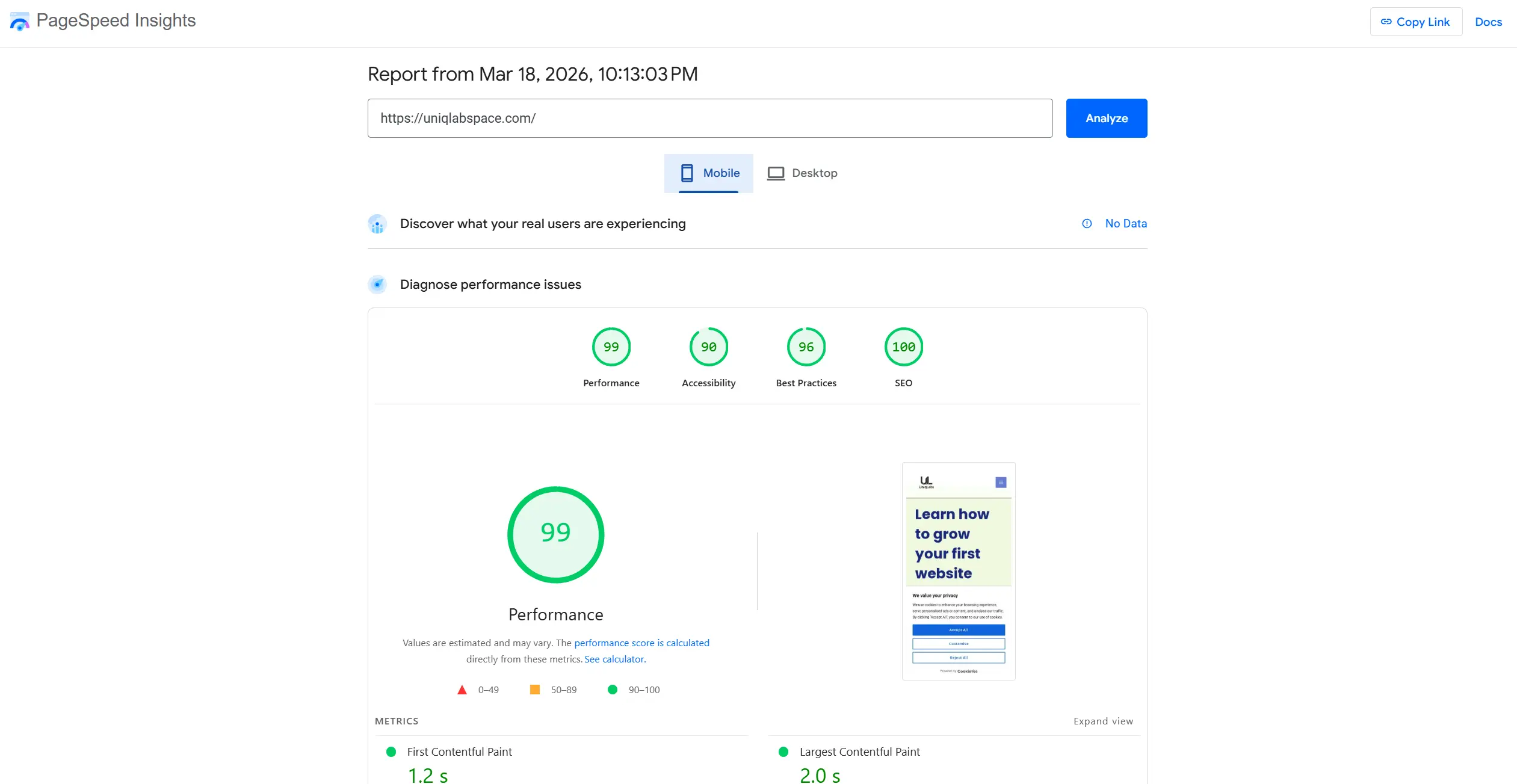
2. Mobile friendliness Most people will visit your site from their phone. Google indexes the mobile version of your site first (this is called mobile-first indexing). Go to Google’s Mobile-Friendly Test and check your site right now if you haven’t already.
3. Sitemap submitted to Search Console Your sitemap is like a map of your entire site. Submitting it to Google Search Console tells Google exactly what pages exist. If you use Yoast SEO on WordPress, your sitemap is automatically generated at yourdomain.com/sitemap_xml. Go to Search Console, find the Sitemaps section, and submit it.
4. No broken pages or crawl errors Open Google Search Console and click on “Pages.” Look for any errors like “Not Found (404)” or “Redirect Error.” Fix these as soon as you spot them. Broken pages waste Google’s crawl budget and hurt user experience.
5. Robots.txt is not blocking your pages This is a small file that tells Google which pages to crawl and which to ignore. Sometimes beginners accidentally block their own pages. Check yours at yourdomain.com/robots.txt and make sure it does not say “Disallow: /” (that would block everything).
You do not need to be a developer to handle any of this. Search Console will flag most problems for you. Check it at least once a week when your site is new.
Why Your Website Is Still Not Ranking (Even After Doing Everything)
Your website is not ranking yet because SEO takes time, especially for new sites.
Even if you do everything right, Google still needs to trust your website.
Based on industry data like this Ahrefs study, most pages take months to rank, not days.
In my case:
- Site is still new
- Limited backlinks
- Few indexed pages
So it’s normal that rankings are slow.
What matters is consistency.
Keep publishing content. Improve internal linking. Build backlinks slowly.
Conclusion
SEO for a new website is slow, but it’s predictable.
If you follow the right order, things start to click.
Here’s what you should focus on:
- Get your pages indexed first
- Target low-competition keywords
- Create helpful content
- Build your first backlinks
That’s it.
Don’t overcomplicate it.
I’m still early in my journey, and things are starting to move slowly. If you’re in the same stage, just stay consistent.
And if you want to go deeper, check my other blogs where I break down each step in detail.