
When I first set up GA4 for UniqLabs, I stared at the Traffic Acquisition report for a good 10 minutes with no idea what I was looking at. Organic Search showed 3 sessions. Search Console showed 11 clicks. My first thought was that something was broken or I had set it up wrong.
It was not broken. I just did not understand what each tool was actually measuring, and that confusion is exactly what this post is about.
If you are new to Google Analytics and you have been trying to figure out what organic traffic in Google Analytics actually means, and why the numbers never seem to match Search Console, you are in the right place. My site, UniqLabs, is built for beginners learning SEO, Google Analytics, and AI tools. So this is the kind of question I deal with firsthand, not just something I read about.
The good news is that organic traffic is not hard to understand once you separate what each tool is designed to show. Google Search Console shows what happened in Google Search before someone reached your site. Google Analytics shows what they did after they landed. That one difference changes how you read everything.
What is organic traffic in Google Analytics?
Organic traffic in Google Analytics is the visitors who found your site by searching for something on Google, saw your page in the unpaid results, and clicked it. That visit gets recorded as an organic session in GA4. In GA4, you usually see it in acquisition reports under organic search-related dimensions, and if you connect Search Console, Google also gives you reports for queries and landing pages. It is the clearest signal that your SEO is bringing people in without ads.
A simple example helps. If someone searches for a topic on Google, clicks your page from a normal search result, and lands on your site, that visit counts as organic traffic. If the person clicked a paid ad instead, that is not organic traffic. Google itself describes an organic search result as a free listing that appears because it matches the search terms.
This is why beginners should treat organic traffic as more than a number. It is a signal that your content is visible in search, that Google can understand your page, and that people think your result is worth clicking. Google says SEO is about helping search engines understand your content and helping users find your site, which is exactly what organic traffic measures in practice.
Why organic traffic matters for beginners
Organic traffic matters because it is one of the few channels that can keep growing after the work is done. Paid traffic stops the moment your budget runs out. Organic traffic can keep bringing visitors long after you hit publish, as long as the page stays useful and findable.
For beginners, it also tells you whether your SEO basics are actually working. If your content is indexed, your pages are structured well, and your topics match what people search for, organic traffic becomes the proof. It is not one magic trick. It is usually several smaller things working together: crawling, indexing, and your content earning a click.
I will be honest about where I am with UniqLabs right now. Some days GA4 shows single-digit organic sessions. I check it more than I probably should. But every time that number ticks up, even slightly, I know something I did actually worked. A keyword I targeted got indexed. A title someone clicked. That feedback loop is what makes organic traffic worth tracking for a beginner, because it is the clearest signal you have that your SEO foundation is holding up.
It also helps you stay patient. Google does not guarantee it will crawl, index, or serve every page, even if you follow all the basics. Slow traffic in the early months does not always mean you did something wrong. Sometimes it just means the site is still earning trust.
Where do I find organic traffic in Google Analytics?
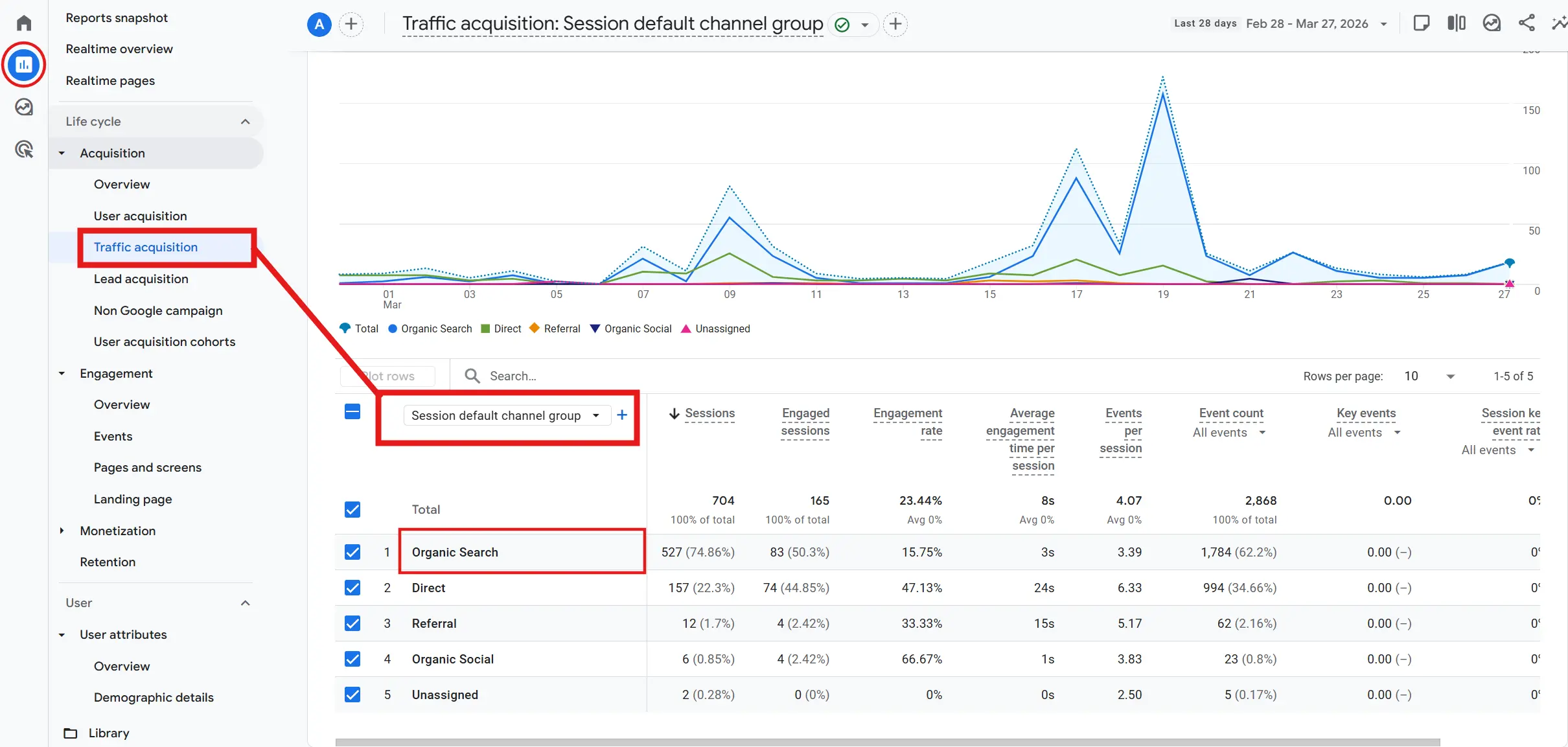
You can find organic traffic in GA4 by going to Reports > Acquisition > Traffic acquisition. In that report, look for Session default channel group and find Organic Search. Google says this report is designed to show where your website and app visitors are coming from.
If you have linked Search Console, you can also open the Google organic search traffic report. That report shows landing pages with their Search Console and Analytics metrics. If you cannot see it, go to the Library in GA4 and publish it from there. That report is useful when you want to see which pages get organic visits and which devices or countries those visits come from.
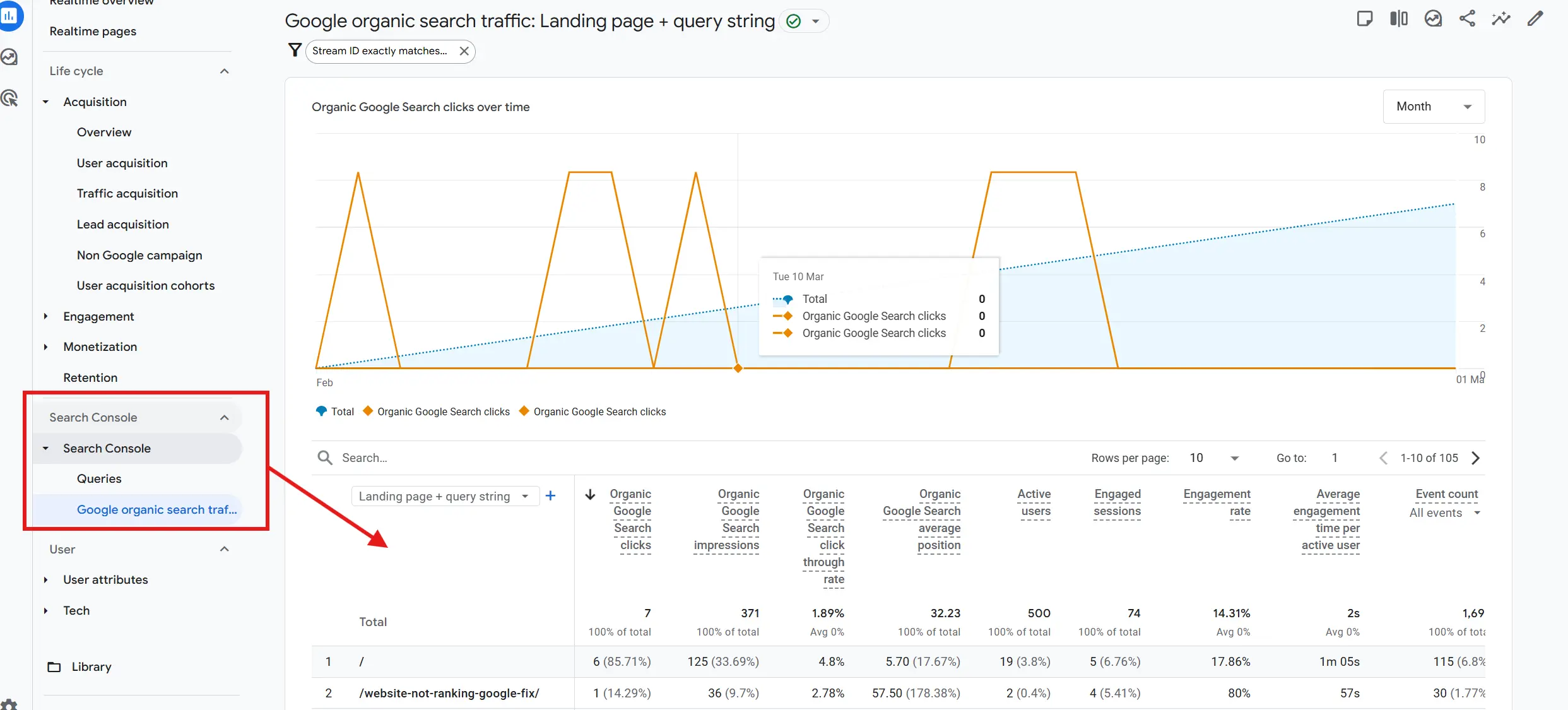
If you are unable to find the search console option as shown in the screenshot, let me know in the comments.
One detail beginners often miss is that the Traffic acquisition report is session based. That means it shows where sessions came from, not just where a user first came from. Google separates session-scoped dimensions from user-scoped dimensions, so the same person can appear differently depending on the report you open.
If you want the page-level view, the Landing page report is also helpful. The Landing page report shows the first page a visitor lands on and how many people land on each page. That makes it useful for checking which pages are actually attracting organic search visitors.
Why GA4 and Search Console numbers do not match
GA4 and Search Console do not show the same numbers because they measure different things. Search Console tracks how often your content appears in Google Search and how often people click your result. GA4 tracks what happens after the visitor reaches your site, such as sessions and engagement. Google says these tools use different metrics and systems, so the data will not match completely.
That mismatch is not a bug by itself. Search Console counts clicks from Google Search results. GA4 counts sessions, which are periods of interaction on your site. A click can happen without a session being recorded, and a session can exist in GA4 without a clean Search Console match.
Why the Numbers Do Not Match (And Why That Is Okay)
Here is a real example from UniqLabs. When my site first started getting indexed, Search Console showed 4 clicks over a week. GA4 showed 1 organic session in that same period. My first instinct was that GA4 was broken or not set up right. It was not. One of those clicks probably came from a quick visit that did not trigger a full session. Another might have had a tracking gap. The tools were both working fine, they were just counting different things. Once I understood that, the mismatch stopped feeling like a problem and started feeling like useful information.
There are also timing differences. Google says Search Console data becomes available in Analytics 48 hours after it is collected by Search Console, and the reports only keep up to 16 months of data. If you recently connected the tools, or if you are looking at a narrow date range, the gap can look bigger than it really is.
This is the beginner mistake I see most often. People look at clicks in Search Console and expect the exact same number in GA4. The systems simply do not work that way. The better habit is to compare trends, not obsess over perfect equality. Google even recommends focusing on the most comparable metrics, Search Console clicks and GA sessions, when you are trying to understand general patterns.
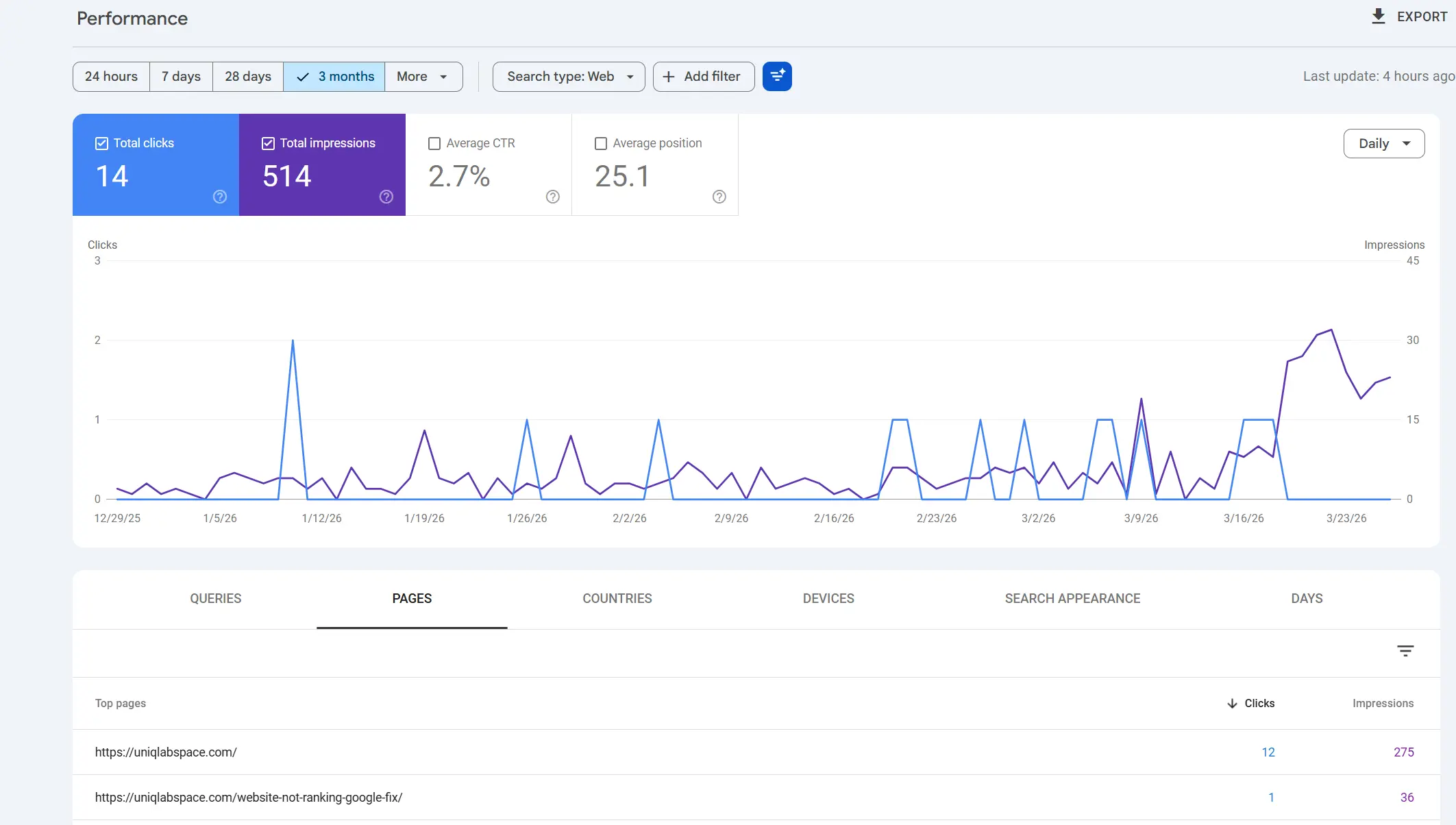
GSC screenshot
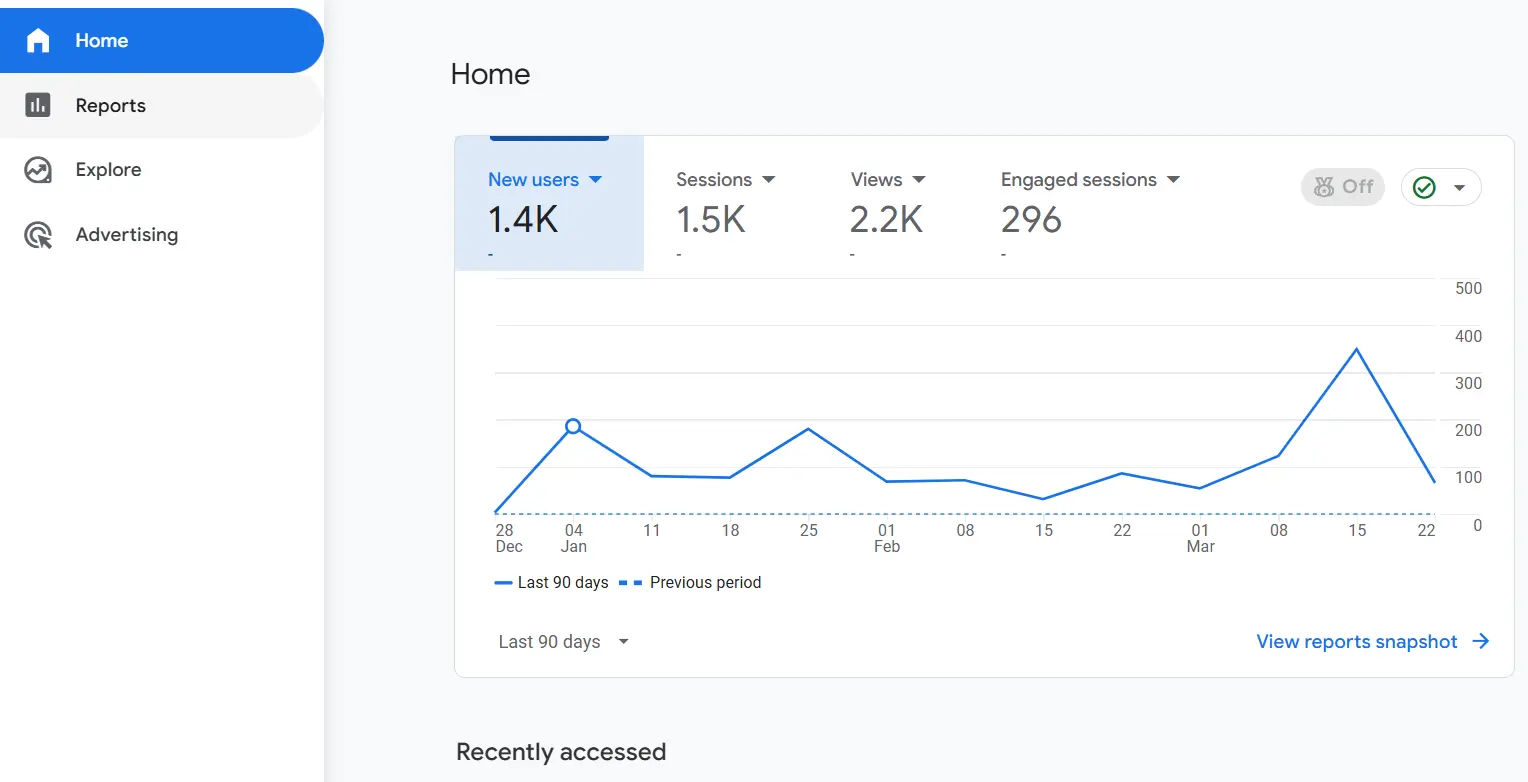
GA4 screenshot
How do you grow organic traffic as a beginner?
Organic traffic grows when Google can find your pages, understand them, and decide that they answer a search query better than the competing pages. The beginner path is straightforward: pick low-competition topics, publish content that actually helps someone, make your pages easy to crawl, and connect related posts with internal links.
Start with keyword research that matches where your site is right now. New sites usually do better targeting focused, long-tail phrases than going after broad competitive terms. My keyword research process guide covers this in more detail, but the short version is: find topics with real search intent and low competition, then build from there.
Make Sure Google Can Find Your Pages
Make sure Google can actually reach your content. Sitemaps help Google discover pages that are new or updated. Internal links help too, because Google discovers your pages through links from other known pages. On a small site, internal linking is one of the highest-leverage things you can do.
The last piece is content quality. Short, clear, useful pages tend to win over padded ones. One strong article is better than three vague ones, especially when you are just starting out.
This is roughly the routine I follow for UniqLabs right now:
- Pick a topic with clear search intent
- Write the answer early in the post, not buried at the bottom
- Add internal links to related posts
- Check Search Console and GA4 every few days
- Improve pages that are getting impressions but low clicks
That is also why I keep my content tied together. My website not ranking post supports this one, because if traffic is low, the fix is often in indexing, content, or structure, not in analytics itself.
Organic traffic vs direct vs paid
Organic traffic comes from unpaid search results. Direct traffic usually means someone typed your URL, used a bookmark, or came from a source Analytics could not identify. Paid traffic comes from ads. Those three buckets are different, and mixing them up makes the report useless.
Here is the simplest way to think about it. If the person found you through search and did not click an ad, it is organic. Clicking an ad makes it paid traffic instead. Someone who typed your URL directly or used a bookmark falls under direct traffic. That is why the Session default channel group is so helpful for beginners, because it turns messy traffic data into a readable picture.
The mistake is assuming one channel is always better than the others. Organic traffic is powerful because it compounds, but direct traffic can show brand recall, and paid traffic can help you test offers faster.
Conclusion
Organic traffic in Google Analytics is not just a number to screenshot and post about. It is proof that your content showed up in search, without paying for a single click. Once you know where to find it in GA4, and you understand why it will never perfectly match Search Console, the data starts to make sense in a way that actually helps you improve.
If you are just starting out, do not try to fix everything at once. Pick one report, understand one metric, make one improvement. That is how this stuff starts clicking. I am still in the early stages with UniqLabs, but every small spike in organic traffic tells me the foundation is working. Start there, and build from what you learn.
After this, check out my guides on keyword research, SEO for a new website, and market research. Organic traffic does not start in Google Analytics. It starts with the right topic and the right content.